
Schedule discounts and price changes
Plus showing and hiding products, and adding them to or removing them from a category. Pick products by name or a whole category.

Pick when the offer starts and ends. PopAutomate applies the discount, changes prices and shows or hides products on time, then puts everything back.
Install from the Salla or Zid app store and your account is created for you. Billing goes through the platform.
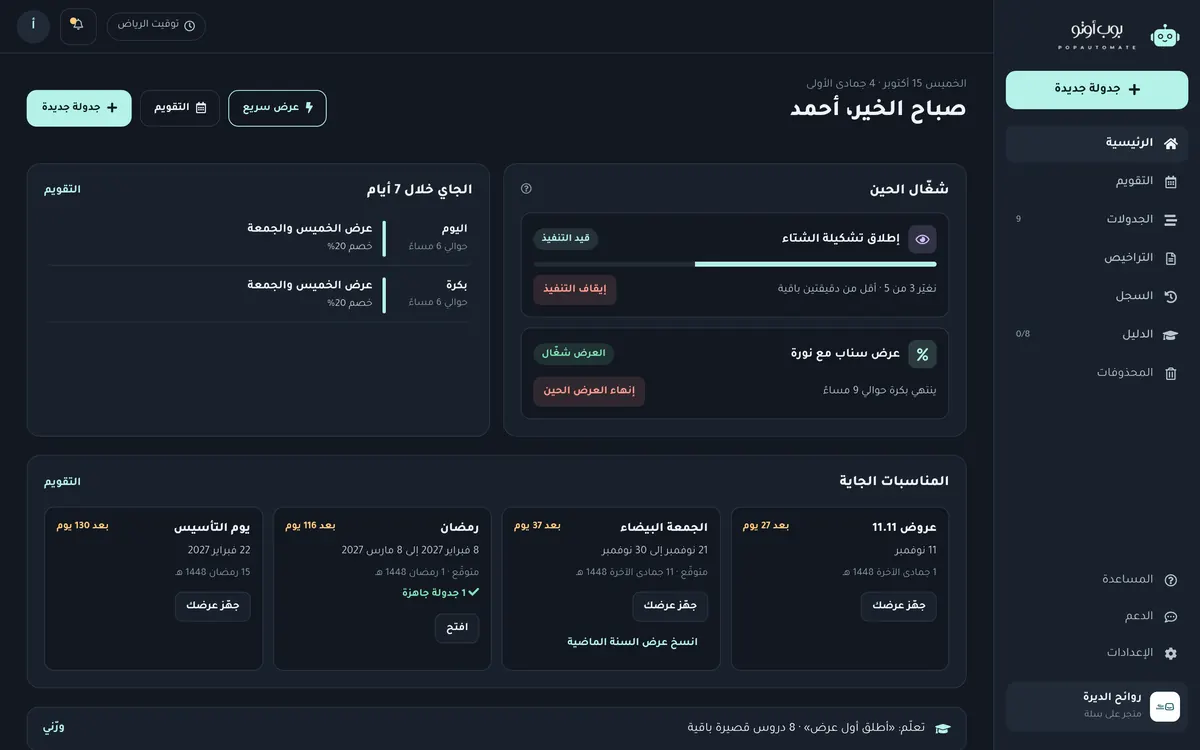

One dashboard for all your offers: what is live now and what is coming in the next 7 days
Every season it's the same: you stay up past midnight changing prices, showing some products and hiding others, then undo it all one by one when the offer ends. Miss one and a customer sees an expired offer or pays the wrong price. PopAutomate lets you set it all up ahead of time and runs it on the minute.
Plus showing and hiding products, and adding them to or removing them from a category. Pick products by name or a whole category.
Bulk discounts and price changes from a CSV with a price per product, checked before you turn it on. Up to 50,000 rows per file.
The same dashboard and steps on both platforms, connected through the official app store.
The calendar inside PopAutomate reminds you before each season, and you start its schedule from a ready template in one click. A season is only a reminder: nothing changes in your store until you turn its schedule on.
A discount that starts at the first minute of the day and ends by itself at the close.
Per the Umm al-Qura calendar
Show your Ramadan range before the month starts and set up the last-ten-nights offer now.
Per the Umm al-Qura calendar
Your Eid collection appears on time and hides after Eid.
Per the Umm al-Qura calendar
The first-days offer starts and ends on time, even while you're on holiday.
August, per the Ministry of Education calendar
Add school products to your offers category and they leave it by themselves after the season.
Schedule your National Day offer on the whole store or chosen categories, with prices back to normal afterwards.
A one-day offer that starts and ends right on time, without you staying up for it.
Schedule White Friday discounts for thousands of products from one file, all back to normal after the last day.
A weekend offer (Friday and Saturday), salary week (25th to 28th), or any days you pick, repeating by itself.
Ramadan and Eid dates are expected per the Umm al-Qura calendar and confirmed by moon sighting. Each store sets its own White Friday and Back to School days.
Everything you need for seasonal offers, from the first schedule to the last product back at its price.
Set the discount, the start and the end, and it starts and stops by itself.
Seasonal products appear at launch and hide when the season is over.
Upload a CSV with a price per product and we show you any errors before you turn it on.
Every season with its dates, and a ready template to start each one.
Prices go back by themselves: we save each product's state before a run and restore the original price, visibility and categories when the offer ends.
See what changed on each product and when, and retry only the ones that didn't change.
An email if a run fails or your store disconnects, plus a weekly summary of your schedules.
Keep your Ministry of Commerce discount permit number with each discount schedule, and we remind you if one is missing.
Three steps, no technical skills needed.
From the Salla or Zid app store. Your account is created for you and we email you the link to sign in.
Choose what changes, on which products and when. Before you turn it on, you see the before and after price for each product.
The run starts within a minute of the set time, every product is logged, and you get an email if something goes wrong.

Practical ideas for your store's offers, season by season. (Articles in Arabic)
No. Nothing changes unless you turned a schedule on. Before that, you see the before and after price for every product, and a draft never runs until you activate it. You can pause any schedule or end an offer right away in one click.
Install PopAutomate from the Salla App Store and your account is created for you. A schedule is then four steps: choose the discount, the products or categories, the start and end time, then review the before and after prices and turn it on. No technical skills needed, and the dashboard has a step-by-step guide.
Yes. PopAutomate works on Zid and Salla with the same dashboard and steps. Install it from the Zid App Market; the connection goes through the official app page.
It goes back to its original price. A discount must have an end date and ends by itself. For price changes, show/hide and categories you choose "put it back", which is the default: we save each product's state before the run and restore it at the end. If you edited the product after the run, we leave it and offer "restore anyway".
Yes. Save your Excel sheet as a CSV with a price per product, up to 50,000 rows, for bulk discounts and price changes, and we check the file before you turn it on. Salla and Zid allow a limited number of edits per minute, so large batches take a while, and you can watch the progress on the schedule page.
Yes. Set a time to show or hide them once, or let it repeat: days of the week like Friday and Saturday, days of the month like salary week from the 25th to the 28th, or every few days. Each run starts within a minute of its time, even at midnight.
Discounts in Saudi Arabia need a permit from the Ministry of Commerce; the terms and fees are on the Ministry's site and can change. PopAutomate doesn't apply for you, but you can save the permit number and dates, link it to the discount schedule, get a reminder if a discount schedule has no permit covering its dates, and get the before/after price list ready.
You get an email, and the schedule page lists every product that didn't change with the reason. You can retry just those products. If your store disconnects, you see an alert with a reconnect button.
The connection is made by installing the app from Salla or Zid, with the permissions you approve there; we never ask for your store password. We use the data to run your schedules and don't sell it to anyone. Details are in our privacy policy.
Subscription and billing go through the Salla App Store or the Zid App Market. You'll see the plans and current price on the app page before you install.
Another question? Message us on WhatsApp (opens in a new tab)
Install PopAutomate and let your offers run on time while you rest.
Not sure? Message us on WhatsApp (opens in a new tab)