What is PopAutomate? How a schedule changes your store
PopAutomate changes the products in your Salla or Zid store at a time you set. You create a schedule for the change, such as a discount or a new price. Nothing changes until you activate it.
PopAutomate writes the change into the product itself, inside Salla or Zid. Your customers see your store's prices and categories the way they always do, with nothing added to your pages.
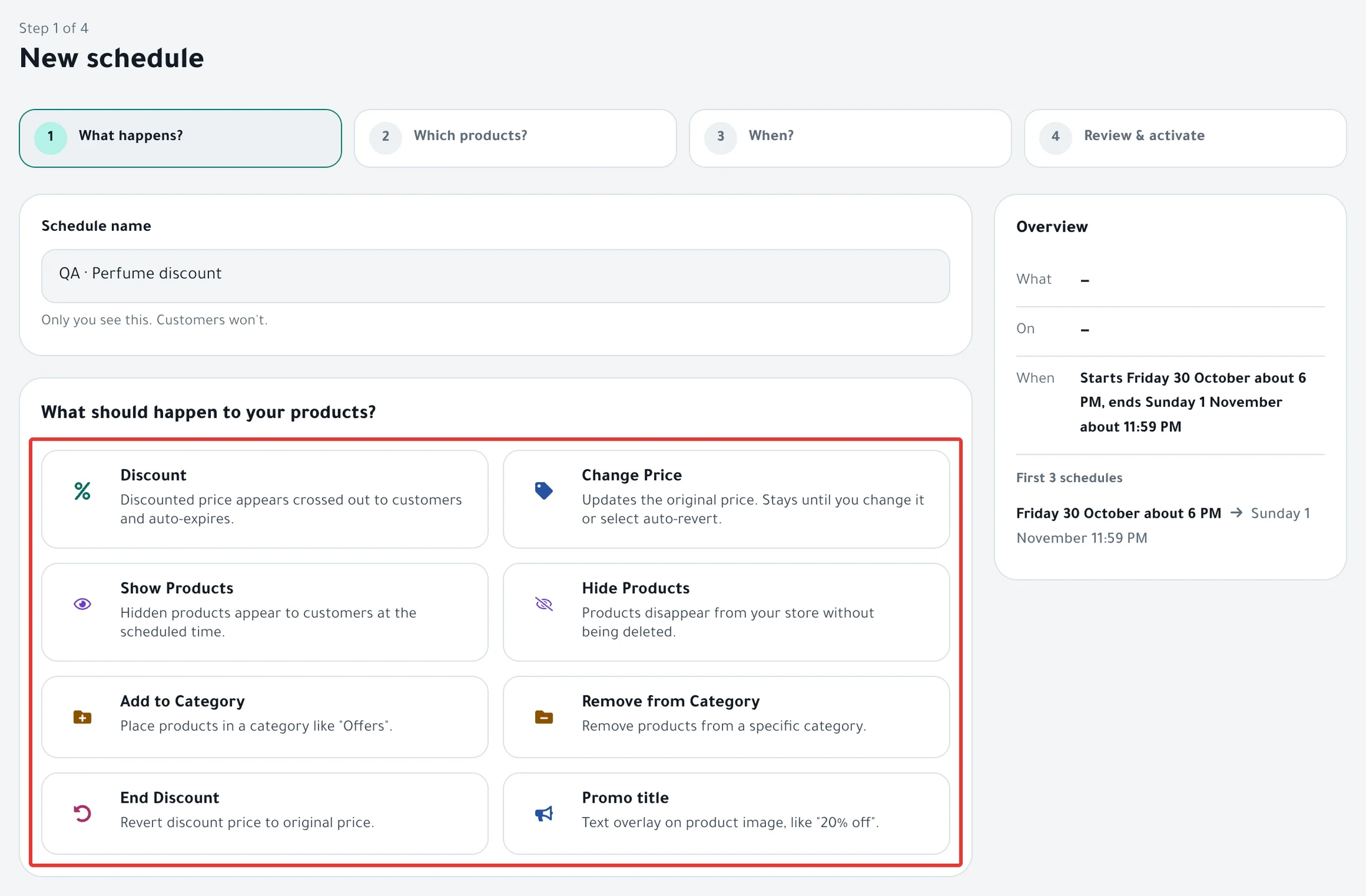
You build a schedule in 4 steps: What happens?, then Which products?, then When?, then Review & activate.
In the first step, you choose one of 8 cards:
| Card | What changes in your store |
|---|---|
| Discount | A sale price, with the original price crossed out next to it. The discount ends on its own |
| Change Price | The original price itself |
| Show Products | Hidden products become visible to your customers |
| Hide Products | Products disappear from your store without being deleted |
| Add to Category | The products go into a category. PopAutomate creates the category if it does not exist |
| Remove from Category | The products leave a category. The category stays |
| End Discount | The discount already on the products ends. This cannot be restored |
| Promo title | Text on the product image, on Salla only |
Example
Noura sells perfume on Salla. She wants 15% off her "Perfumes" category from Thursday at 6 PM to Saturday at 11 PM.
- In What happens?, she chooses Discount and enters 15 in Percentage (%).
- In Which products?, she chooses Categories, then the "Perfumes" category.
- In When?, she chooses One time and sets the start and the end.
- In Review & activate, she sees each product's price before and after the discount, then clicks Enable scheduling.
On Thursday at 6 PM, PopAutomate puts the sale price on the products in "Perfumes" inside Salla. On Saturday at 11 PM the discount ends, and customers see the original price.
When it happens
- Before you activate: nothing changes. Save as draft saves the schedule with the Draft status: "A draft never runs until you activate it."
- At the scheduled time: the run starts within about a minute. PopAutomate changes the products one after another, at about 10 minutes per 100 products.
- If you choose Now: the button changes to Activate and run now, and the run starts when you click it.
- With categories: PopAutomate reads the category's products at every run. A product you add to the category later is included in the next run.
- At the end: a discount ends on its own. Other changes are restored if you choose Restore it under At the end in the When? step.
If a product already had an earlier sale price, your discount replaces it, and the earlier sale price does not come back when your discount ends. Details in Restoring prices after an offer: what comes back?.
What you can do
- A discount that starts and ends at set times: follow Schedule a discount on Salla and Zid.
- An offer that repeats every week or every month: read Repeat an offer every week on Salla and Zid.
- A quick discount on the whole store from Home: read Run a quick discount on Salla and Zid from Home.
Go back to Get started with PopAutomate on your store to see every getting-started article.
Did this article answer your question?