Restoring prices after an offer: what comes back?
The discount ends on its own at its end date. The price, visibility, category and promo title come back at the end only if you choose Restore it.
You choose this in the When? step, under At the end: Restore it or Changes stay. Restore it is the default in every new schedule. With Changes stay, products keep their new state until you change them.
| What the schedule changed | What happens at the end of the offer |
|---|---|
| Discount | The discount ends and the original price appears again. You do not have to choose anything. |
| Change Price | The price from before the schedule comes back if you chose Restore it. |
| Show Products or Hide Products | Products are visible or hidden again, as they were before, if you chose Restore it. |
| Add to Category or Remove from Category | Categories go back to how they were, if you chose Restore it. |
| Promo title | The previous title comes back, if you chose Restore it. |
| End Discount | Nothing comes back. "Ending a discount can't be undone." |
Example
Sarah schedules a 20% discount on "Black abaya" from Thursday to Saturday at 11 PM. On Saturday at 11 PM the discount ends, and customers see the original price.
Sarah also schedules Hide Products for winter products, with Restore it. After the offer ends, customers see these products again.
But "Black abaya" already had an earlier sale price in Salla. Sarah's discount replaced it. When the offer ends, the discount ends and the earlier sale price does not come back.
When it happens
- One-time schedule: at the end date you set.
- Repeating schedule: at the end of each run's day, 11:59 PM. If you set hours for the day, it happens at the end time you chose.
- Repeating discount on Zid with no hours for the day: Zid counts the discount day from 3 AM to 2:59 AM Riyadh time (GMT+3).
- The restore starts within about a minute of the end time and takes about 10 minutes per 100 products.
- The restore appears in Run history as Ended on time if you chose Restore it, or if the discount ended before the end of the day. When a discount ends at the end of the day, Salla or Zid ends it, and no run appears for it.
- In a one-time schedule, PopAutomate cannot restore products without an end date. So the When? step asks for an end date when you choose Restore it. If you remove the end date, this option disappears.
What you can do
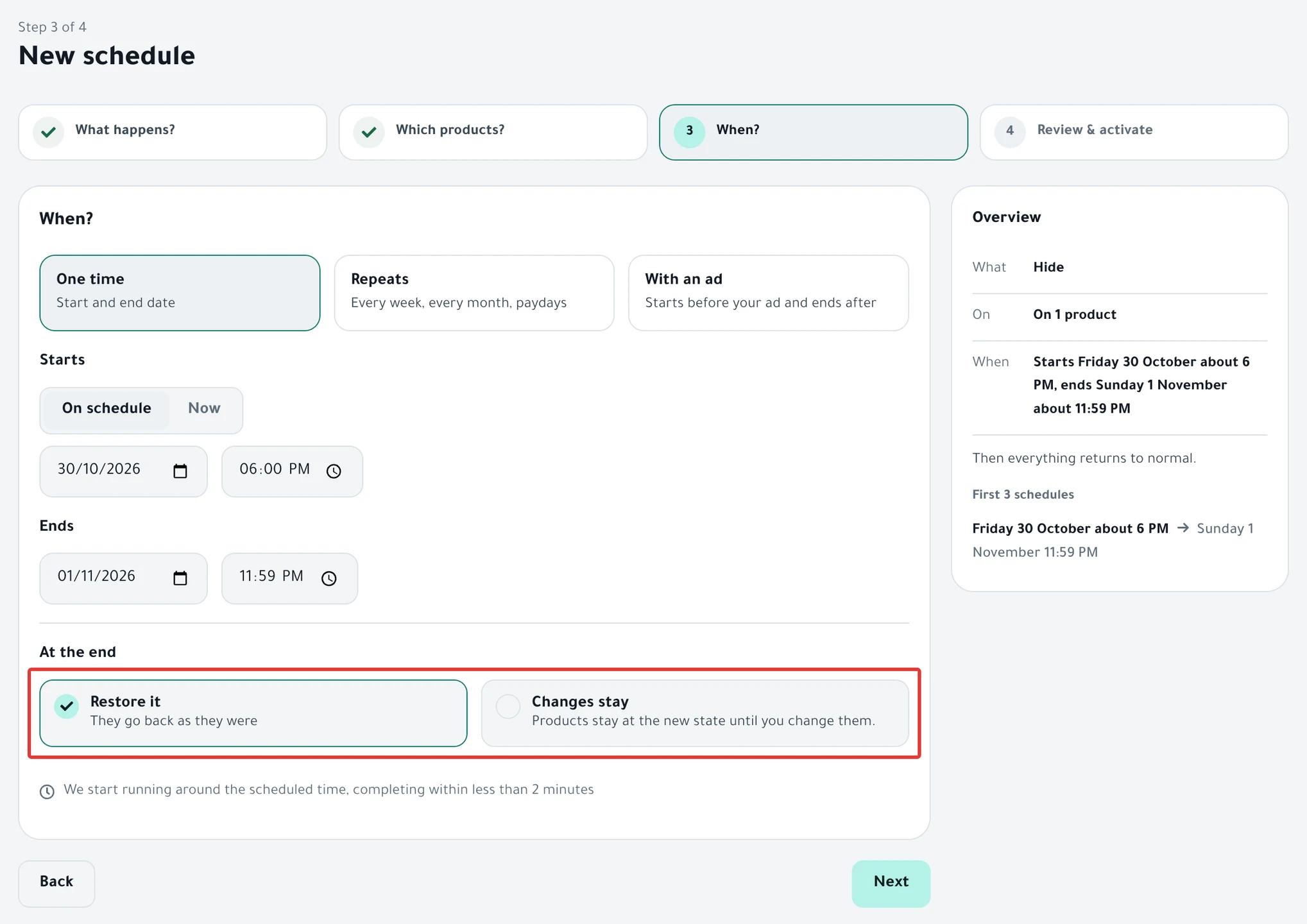
- You want products restored when the offer ends: choose Restore it before you activate. If you chose Changes stay and later need the restore, click Restore on the schedule page. For details, see Restore prices and products after a schedule ran.
- You want to end the offer before its end date: follow End an offer and restore prices now.
- The product had an earlier sale price: PopAutomate does not bring back the earlier sale price after the discount ends. Do not schedule a discount on a product that has an earlier sale price, or set the earlier sale price again yourself after the offer.
- You edited a product yourself after the run: PopAutomate leaves it as you edited it and does not restore it. Next to it you see "Price changed after execution, so we didn't revert it to preserve your changes." Edit it by hand in Salla or Zid if you want.
- Some products did not come back because of an error: PopAutomate retries on its own after 15 minutes, then after an hour, then after 6 hours. If products are still changed after the last try, the "We couldn't put all of “…” back" card appears on Home. You do not need to wait: make sure your store is connected, then open the schedule and click Restore.
- Prices still not back after the offer ended? Causes and fixes are in Prices did not come back after an offer: causes and fixes.
All the articles on tracking your schedules are in Track your schedules: pause, end or restore your products.
Did this article answer your question?